Scattered spreadsheets and files
Finding up-to-date parcel information is difficult.
With GeoFieldOne register with map-based visualization.
GeoField GIS brings land parcels on an interactive map, lease agreements, counterparties and documents together. Track deadlines and manage your land portfolio without scattered spreadsheets.
✓ Full access for 14 days · No payment or credit card required
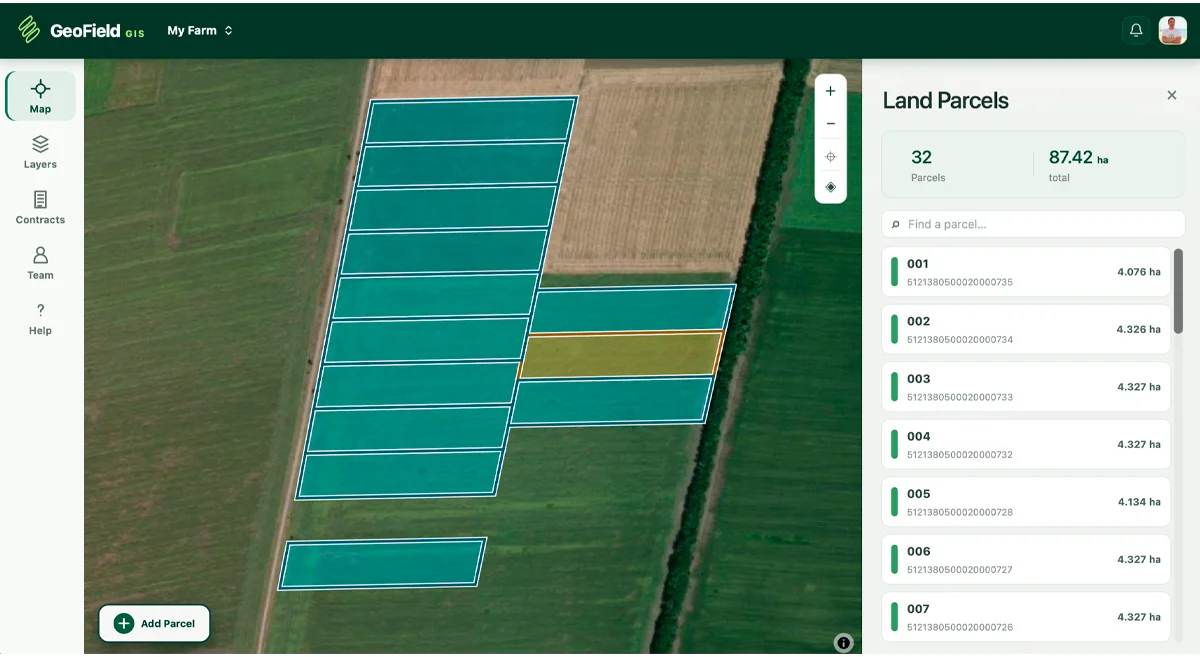
Lease agreements, land shares and documents are often stored separately. GeoField brings them together in one workspace.
Finding up-to-date parcel information is difficult.
With GeoFieldOne register with map-based visualization.
Contract dates require constant checking.
With GeoFieldReminders about upcoming lease expirations.
Reconstructing the sequence of actions is difficult.
With GeoFieldAudit log of important changes.
Finding the right file takes time.
With GeoFieldDocuments linked to agreements.
Maps, registers, agreements and documents — without a cluttered interface.
View parcel boundaries, areas, cadastral IDs and internal reference numbers in one place.
Keep an agreement register, link contracts to parcels, and store financial terms, documents and change history.
Get reminders about important dates and identify multiple active agreements for the same parcel.
Store company details, contact information and related agreements for individuals and legal entities.
Invite team members, configure access permissions and track important changes.
Import KML, TXT and ZIP files, store source materials and attach documents to agreements.
Set up your farm and employee permissions.
Import files or draw boundaries on the map.
Specify the parties, dates, terms and documents.
Spreadsheets work well for simple registers. GeoField brings related tasks together in one service.
| Task | Excel spreadsheets | GeoField GIS |
|---|---|---|
| Land parcel register | Yes | Yes |
| Parcel boundaries on a map | Additional tools required | Built in |
| Linking agreements to parcels | Manual setup required | Built in |
| Deadline reminders | Automation required | Built in |
| Roles and access permissions | Depends on your workflow | Configurable |
| History of important changes | Depends on the tools used | Activity log |
Your land portfolio contains valuable business information. GeoField helps you manage access and maintain a record of activity.
Access to parcels, agreements, finances and documents based on each employee’s role.
Important user actions are recorded in the system.
Automatic backups help protect important information and make recovery possible.
Data transmitted over HTTPS.
GeoField helps keep information up to date, from small teams to the land management departments of agricultural companies.
Keep parcels, agreements, documents and important dates in one workspace. Bring your team on board and manage related companies within one organization.
Tell us how you currently manage your land records. We’ll help you prepare your data and get started with GeoField.
Contact us →The subscription is intended for one organization or a group of related companies. Using the service to manage data for unrelated third parties may require separate terms.
Try free for 14 daysFull access · No payment or credit card required
No. GeoField GIS runs in a modern browser on a computer, tablet or phone. The interface adapts to different screen sizes.
For 360 EUR per year, including VAT, you get access to GeoField GIS’s core modules: parcel mapping, agreements, documents, reminders, team collaboration and the audit log. The plan does not limit land portfolio area or employee numbers.
Yes. Related companies can operate in separate workspaces within one organization.
The subscription covers one organization or a group of related companies. Managing data for unrelated third parties may require separate terms. Contact us to discuss your use case.
You can import KML, TXT or ZIP files, or draw parcel boundaries on the map.
Access is controlled by employee roles and permissions.
The system includes roles and access permissions, an audit log of important changes and automatic backups to support data recovery.
There is no separate plan-based limit on document numbers. Technical file size limits and acceptable-use rules may apply.
GeoField fully supports the following languages: Ukrainian, English, Español, Português, Polski, Slovenčina, Русский, Română, Italiano, Français, Deutsch, Svenska, Norsk, Nederlands, Suomi, Lietuvių, Tiếng Việt, 한국어, Gaeilge, Shqip, Srpski.
Tell us the size of your land portfolio and how you currently manage it. We’ll help you decide whether GeoField is right for your team.
Initial setup and file preparation guidance are available by arrangement.
Choose which technologies the website may use. Essential cookies are always enabled.
You can change your choice at any time using “Cookie settings” in the footer.
